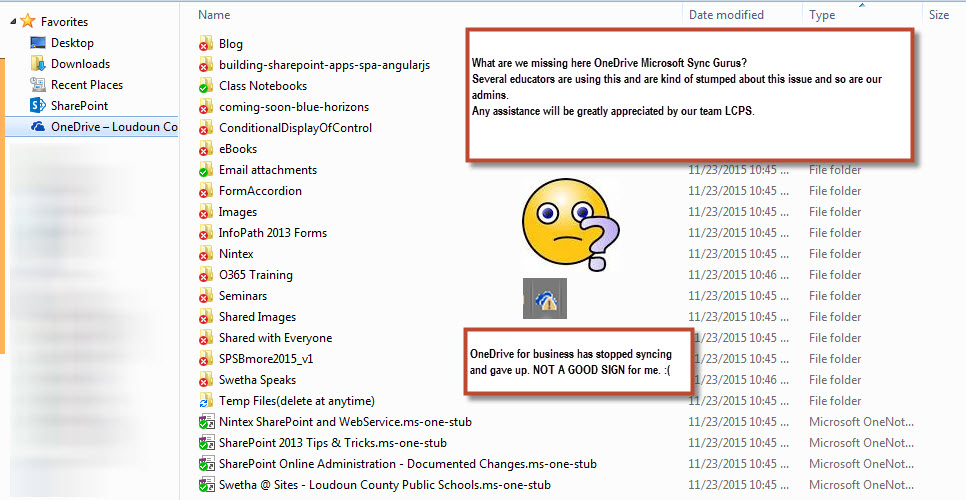
Several of our end-users are experiencing this error with OneDrive for Business Sync stating that they don’t have proper credentials and they are needed to be re-entered.

Only a sideways note to credential manager. Our TRT was able to find a link with a user documenting a fix, but others were not able to replicate all the time: https://community.office365.com/en-us/f/172/t/253213
Following the instructions of the office support community:
- The error message usually occurs when we do not have sufficient permissions on for site. Could you grant yourself (not any SharePoint group) at least the read permission for the site and check if the issue persists?
Pointless, as I am the FULL CONTROL owner of the site.
- Open any Office application, like Outlook client app, and click File / Office Account. Under the connected services, select “add a service” -> “Storage” -> “Office 365 SharePoint“, and then follow the prompts to enter your credentials, etc. Please check to see if the issue persists.

And YES the issue persists. Any ideas @OneDrive gurus?

Heres hoping the powers of OneDrive for Business Gurus help guide us and our end-users/educators to the right solution.
Any ideas @timferro @macksigman or @scottshearer @mrshadeed @rimareyes?
Hugs for helping.
#office365, #onedrive, #onedrivesyncissues, #sharepoint
Discover more from QubitSage Chronicles
Subscribe to get the latest posts sent to your email.